

Adding your email to outlook will easily allow you to receive and store your emails, archive them, organize and keep your emails on your laptop or desktop, while deleting the emails from the sever, opening up space.
below are the steps to take for successful installation of your email on outlook:
1- open outlook, then click on ‘File‘
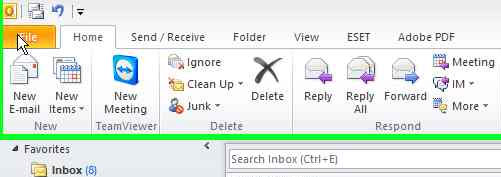
installing email on outlook step 1
2- Choose ‘Info‘ from left menu, then Account Settings > Add
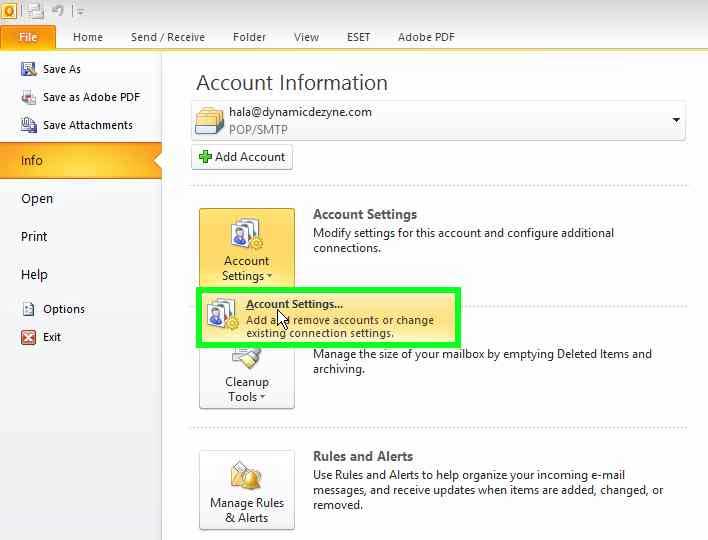
installing email on outlook step 2
3- Now click on ‘NEW‘ from top menu
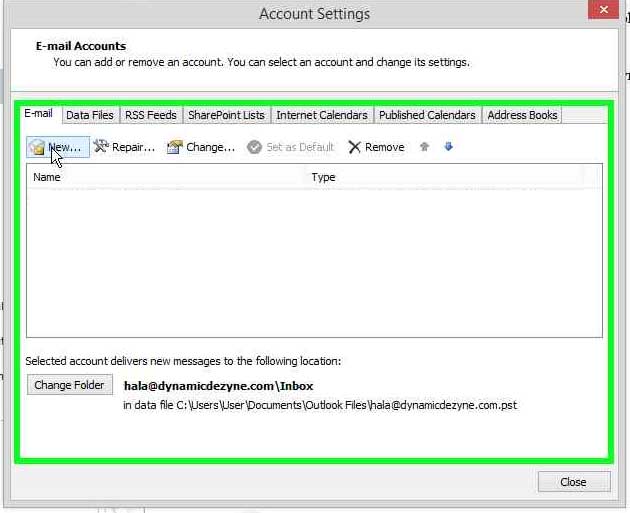
installing email on outlook step 3
4- Choose ‘manually configure server settings or additional server types’
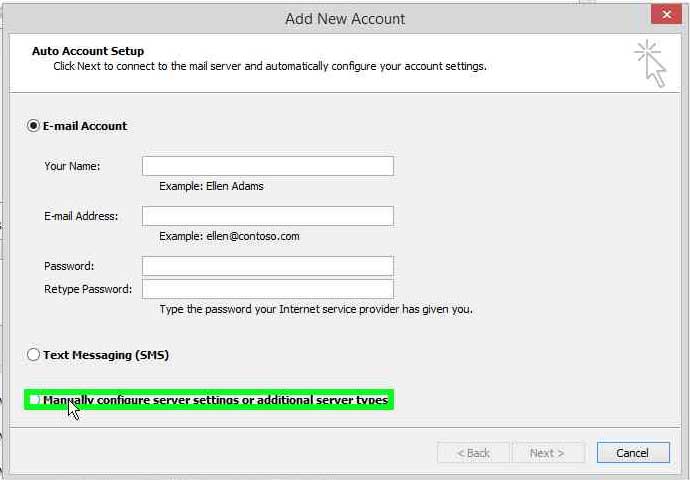
installing email on outlook step 4
5- Click Next
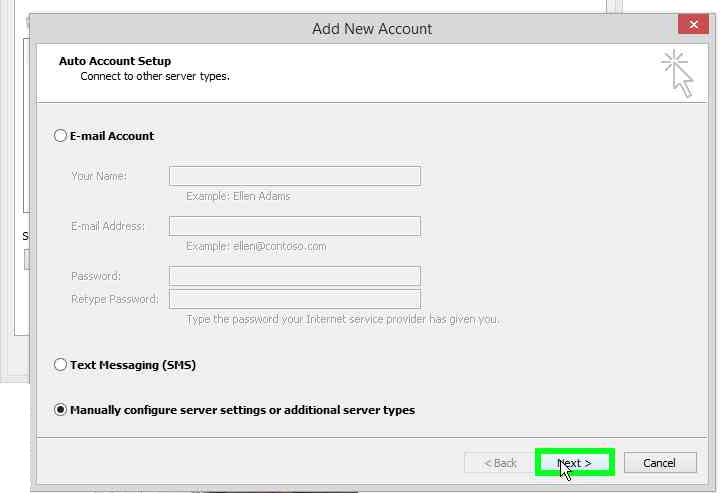
installing email on outlook step 5
6- Choose ‘Internet E-mail’ then click NEXT
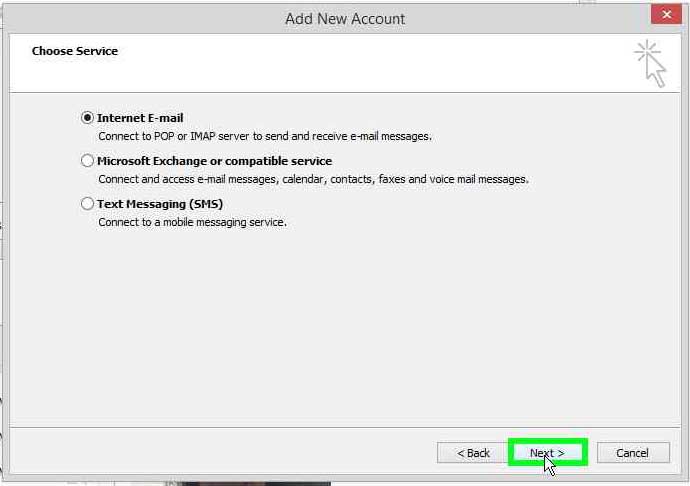
installing email on outlook step 6
7- fill in the details:
a- your full name
b- your full email
c- choose pop3
d- incoming server & outgoing server should both be mail.yourdomain.com replace yourdomain.com with the actual domain example if my domain was ddiweb.net then this would be mail.ddiweb.net
e- user name is your full email (same as the email you put in point b) above)
f- password should be the password for your email
g- select ‘remember password’
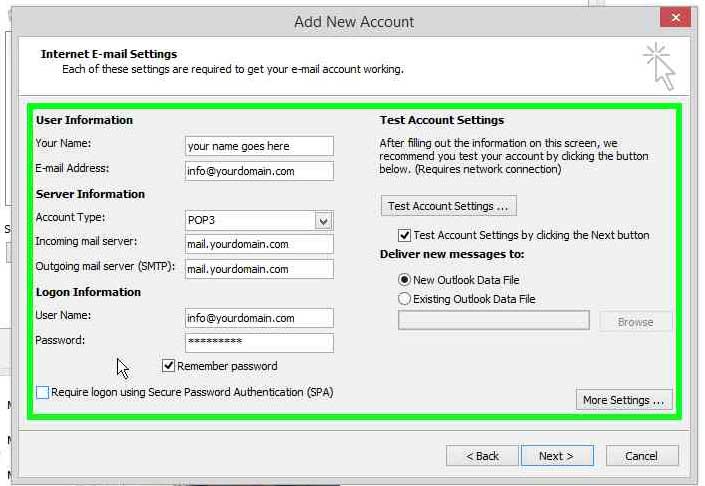
installing email on outlook step 7
8- Now click ‘More Settings’
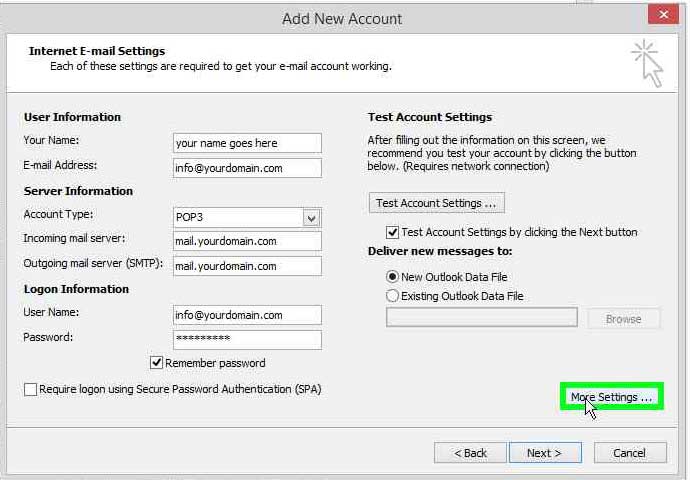
installing email on outlook step 8
9- from Top Tabs:
- click on ‘Outgoing Server‘ Tab
- Select ‘My outgoing server (SMTP) requires authentication
- Ensure that ‘use same settings as my incoming mail server’ is also selected
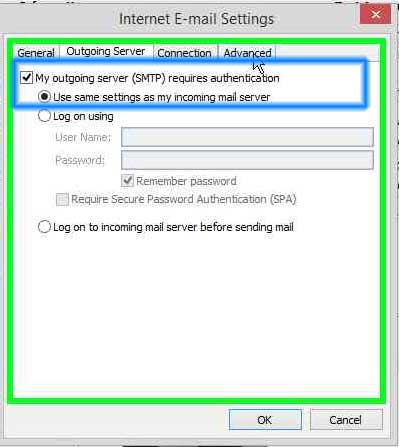
installing email on outlook step 9
10- From Top Tabs:
- Click on ‘Advanced‘ Tab
- Check that pop3 port is 110
- Change smtp port to 26
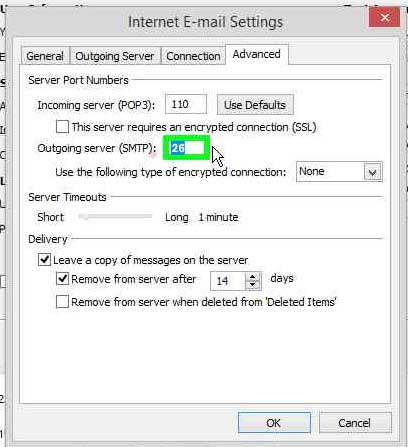
installing email on outlook step 10
11- change the remove from server after to 2 days maximum to avoid filing up your space.
2 days is long enough for you to receive your emails on your mobile and on your laptop.
This setting is for your emails to stay on the server after you have downloaded them on outlook for 2 days.
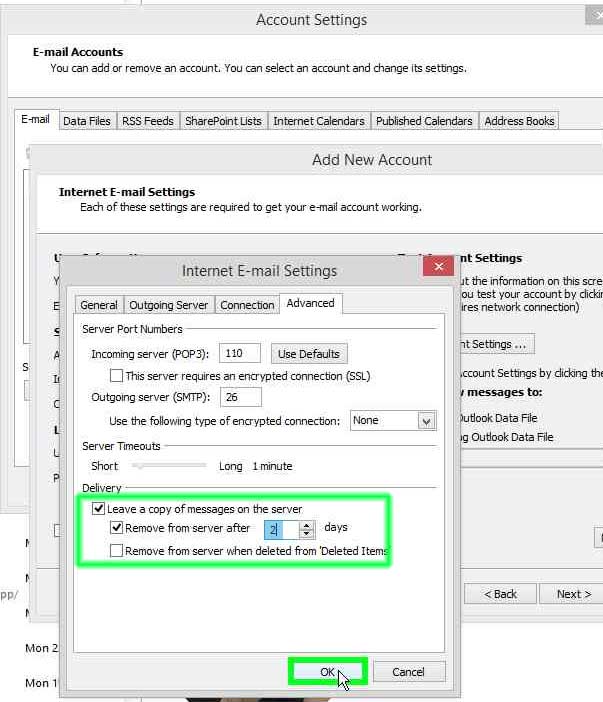
installing email on outlook step 11
12- Click NEXT and now outlook will test your settings
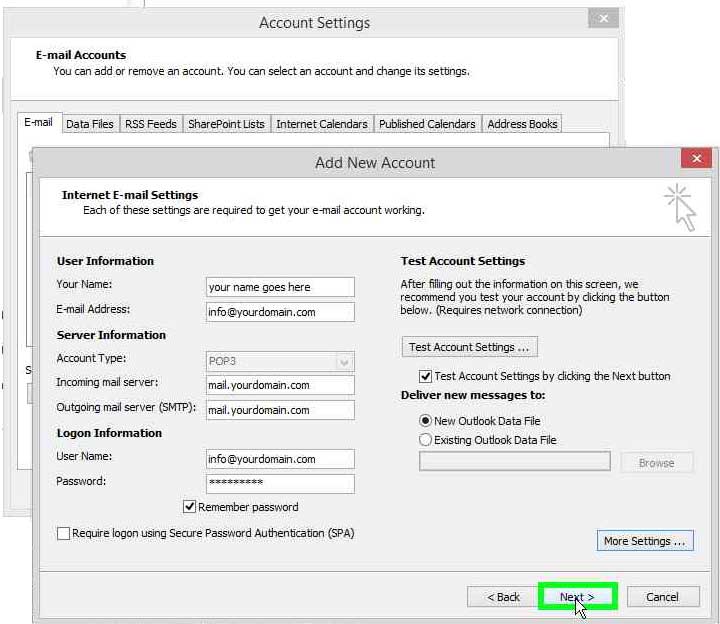
installing email on outlook step 12
13- A Test Account settings will attempt to access the mail server and test that your settings are correct, once you see the correct signs, click Close.
If the test failed, then go back and double check that you entered all the right information in steps 7- 10 and repeat the test
you could have misspelled your email, domain, or password, or perhaps added a space in the server name, or forgot to change smtp port to 26.
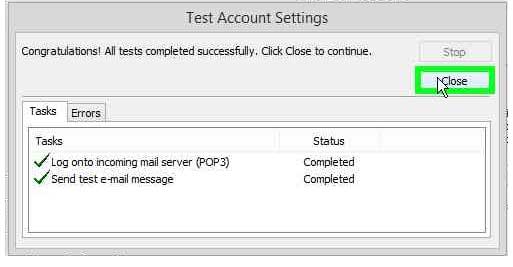
installing email on outlook step 13
14- If all is correct and the test passed, click the Finish
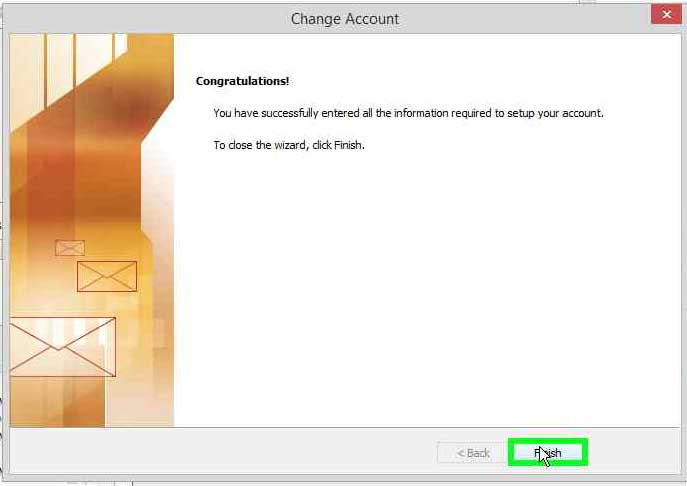
installing email on outlook step 14
15- Now you can see the new email you installed appear under emails, click Close to finish installation
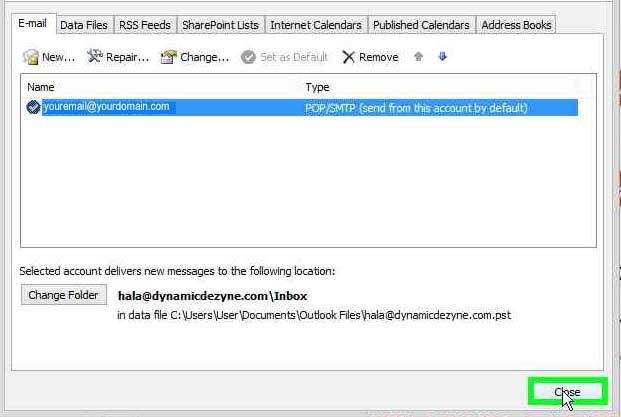
installing email on outlook step 15
16- From Top Menu of main Outlook, click ‘HOME‘ Tab then Click ‘SEND & RECEIVE’ to start receiving your emails.
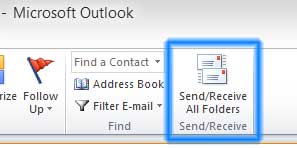
installing email on outlook step 16
Tired of traffic that doesn’t convert? Switch to AI-powered targeting that focuses on keywords and exact locations, then learns from every visit. Claim your free 7-day trial today—no contracts required and cancel anytime.
https://cutt.ly/kyzApgCV
We don’t sell impressions. We route real people who’ve already shown interest in your exact keywords, from the exact locations you serve, to your website. See it for yourself with a free 7-day trial.
https://cutt.ly/oyzApj4p
Think of Vantovo as a full-time scout in your target market: it watches thousands of partner sites, spots visitors who match your keywords and location, and sends them straight to you. Free for a week, no contract, no pressure.
Get more information and start your free trial here: https://blankslatelife.com
Why keep throwing money at paid ads that plateau? Vantovo’s AI continuously re-scores your keywords and adjusts targeting in real time, so your traffic keeps improving instead of stalling. Try it free for 7 days, cancel anytime.
https://cutt.ly/WykOWLDI
Stop relying on expensive, less targeted advertising. Vantovo delivers keyword and location-focused traffic that adapts daily. Most clients notice better leads and sales. Test it risk-free with a 7-day free trial and cancel at any time.
https://cutt.ly/hykOEpDJ
Stop paying for clicks that might convert. Start routing visitors whose behavior already signals real interest in your keywords and location. Vantovo’s AI makes the match; you just watch the results come in. Free trial, 7 days, cancel whenever.
https://cutt.ly/QykOEkK8
See measurable improvement in the quality of your traffic. Keyword and location targeting powered by adaptive AI across a partner network means the system gets better the longer it runs. Clients frequently report increases in leads and sales. Free 7-day trial available with no contracts.
Get more information and start your free trial here: https://blankslatelife.com
Tired of traffic that doesn’t convert? Switch to AI-powered targeting that focuses on keywords and exact locations across a partner network, then learns from every visit. Claim your free 7-day trial today—no contracts required and cancel anytime.
Get more information and start your free trial here: https://cutt.ly/3yjxWSlj
Skip the broad audience waste. Target by the exact keywords and locations that matter to your business, and let our AI find and deliver the matching visitors. Try it free for 7 days. Cancel anytime with no contracts.
https://cutt.ly/GyjxWVHp
No more set-it-and-forget-it campaigns that slowly lose relevance. Vantovo’s system re-scores performance frequently and adapts daily based on real visitor outcomes. Try keyword and location targeting free for 7 days—no contracts, cancel anytime.
https://cutt.ly/myjxWmV5
See the difference precise targeting makes. Choose your keywords and locations (country, state, city, or zip), and Vantovo’s AI finds interested visitors on partner sites and routes them to your site. Try it free for 7 days with no contracts and cancel whenever.
Get more information and start your free trial here: https://cutt.ly/SygS6OAZ